
A shared budget for two, without sharing bank passwords
Bolso lets you share a financial workspace with the person you live with, through a private iCloud invite. Neither of you connects a bank account or hands over a password. Each person's own preferences stay private, and whoever created the share can revoke it at any time without going through us — there is no server of ours in between.
Money in a couple usually lands at one of two extremes
Either you each keep to yourselves and nobody sees the whole picture, or everything goes into an app wired to both people's bank accounts and no private space is left.
There is a middle ground almost no tool offers: following shared spending together without handing over anyone's bank history, and without the app knowing who either of you are.
Bolso's sharing is that middle ground. It is not a joint account — it is a workspace shared between iPhones, through the iCloud of whoever set it up.
How sharing works
- 01
One of you creates the share
Sharing uses iCloud invitations, the same ones behind shared Notes and Reminders. A private invitation is created that only someone with the link can accept.
- 02
Only what needs sharing is shared
Financial data marked as shareable becomes visible. Personal preferences — theme, profile, forecast — stay private to each participant.
- 03
Shared expenses settle themselves
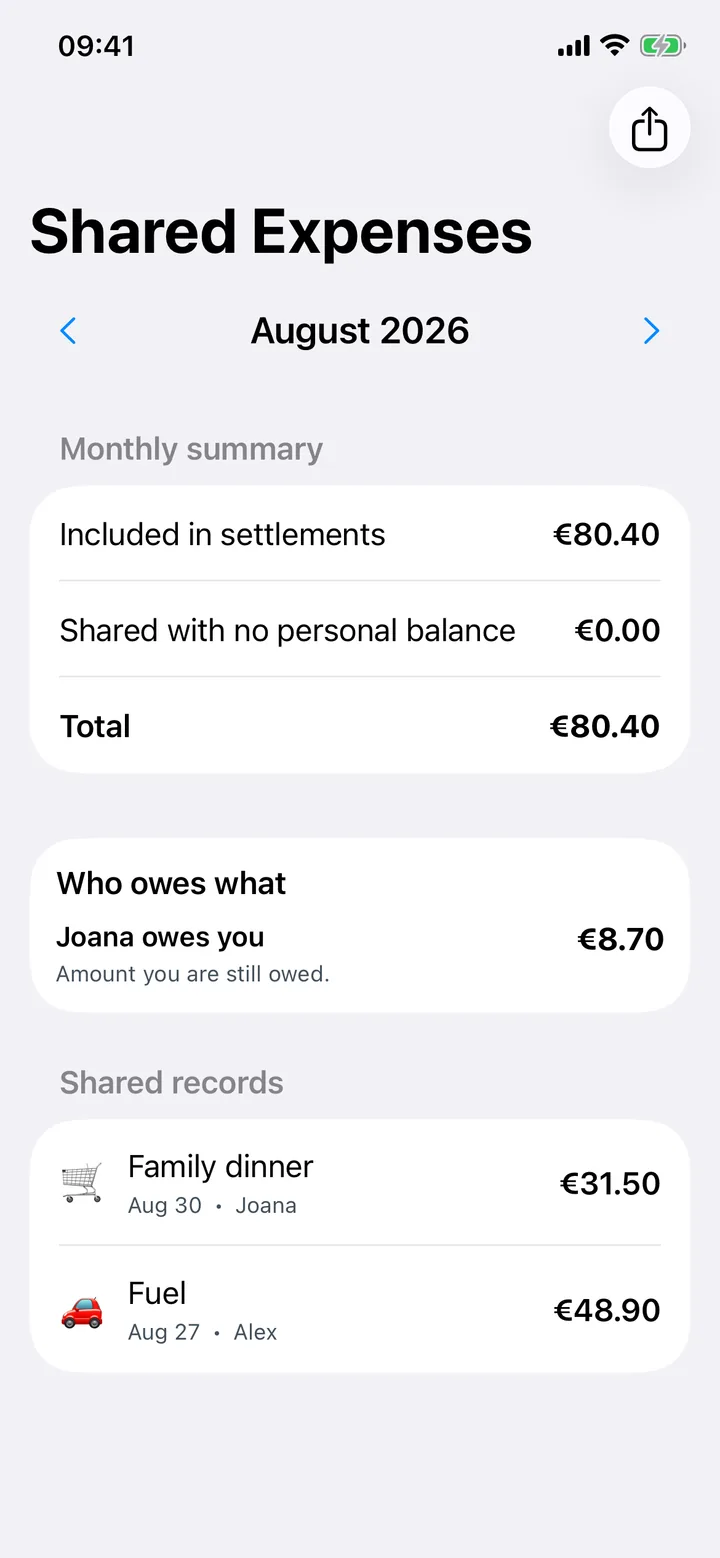
The app records who paid, who is in, and each person's percentage or amount, then works out the settlement: who ends up owing what to whom. Nobody has to reconstruct the month from memory.
- 04
Sharing is part of Bolso Pro
Family sharing is a Pro feature, and one subscription covers it: the person who creates the share pays, and that covers edit access for the whole shared workspace. If it lapses, participants drop to read-only until it is renewed.
- 05
Leaving does not go through us
End the share in Bolso's settings or in iOS Settings > iCloud. Whoever created it can revoke the invitation at any time.
What sharing is not
It is not a joint bank account and it does not connect to banks. You still enter transactions yourselves, as everywhere else in the app.
The settlement is a figure, not a transfer. Bolso tells you who owes what to whom; paying it stays between you, by whatever means you use.
It does not share everything, by design. Each participant's personal preferences stay private, forecast included.
If the share owner's subscription lapses, participants drop to read-only until it is renewed.
It needs iCloud, because that is how the sharing happens. Without iCloud the app still works, but only with that iPhone's local data.
Common questions
- Do I have to share my bank password?
- No. Bolso does not connect to banks, so there are no banking credentials involved anywhere in the app.
- Does the other person see everything I record?
- They see the financial data marked as shareable in that workspace. Theme, profile and forecast stay private to each participant.
- Do both people need a subscription?
- No. The share owner's subscription covers edit access to the shared workspace. Bolso Pro also works with Apple Family Sharing, so if the subscriber is in a Family Sharing group, the other members get Bolso Pro too.
- Does the app tell us who owes whom?
- Yes. From who paid each shared expense and each person's share, Bolso works out the settlement between participants. Paying it is between you — the app moves no money and connects to no bank account.
- How do I leave a share?
- In Bolso's settings, or in iOS Settings > iCloud. Whoever created the share can also revoke the invitation whenever they want.
- Can anyone outside see our data?
- No. The app provides no lists, aggregates or reports about the data of people sharing with you to anyone outside that share, and we have no access to your iCloud account.
Try it together.
Free on the App Store, with a common 7-day Bolso Pro trial that eligible users choose to activate through iCloud; access starts after confirmation.

Read next
Reviewed 2026-08-28 · Bolso team